

Cart recovery gets all the attention. It deserves some of it, because someone who filled a cart was close to buying.
But think about how few people get that far.
For every shopper who puts something in their cart, several more look at a product, read a bit, and leave without touching the cart at all. That group is much bigger. Almost nobody follows up with them, because until recently there was no way to.
That is what a browse reminder does.
What a Browse Reminder Is
A browse reminder is a message that goes out on its own to someone who looked at a product on your store and then left without doing anything else.
They did not add it to their cart. They did not buy. They looked, and then they were gone.
The automation notices that and follows up over the next few days. You set it up once and it handles every product and every shopper from then on.
It is one of five automations that run in the background, which we cover in our guide to Shopify push automations.
Why These Shoppers Are Worth Chasing
It is easy to think someone who did not add to cart was not interested. Usually that is wrong.
People leave product pages for boring reasons. Someone called them. Their bus came. They wanted to check the price somewhere else. They were on their phone waiting in line and meant to come back later on a laptop. They liked it but wanted to think.
None of those are a no. They are interruptions. The shopper simply never came back, because nothing reminded them to.
The number of shoppers also matters. If ten times more people look at products than fill carts, then even a small percentage of those shoppers buying can add up to more orders than cart recovery brings in. Cart recovery earns more per message. Browse reminders reach far more people.
The Timing, and Why It Is Spread Out
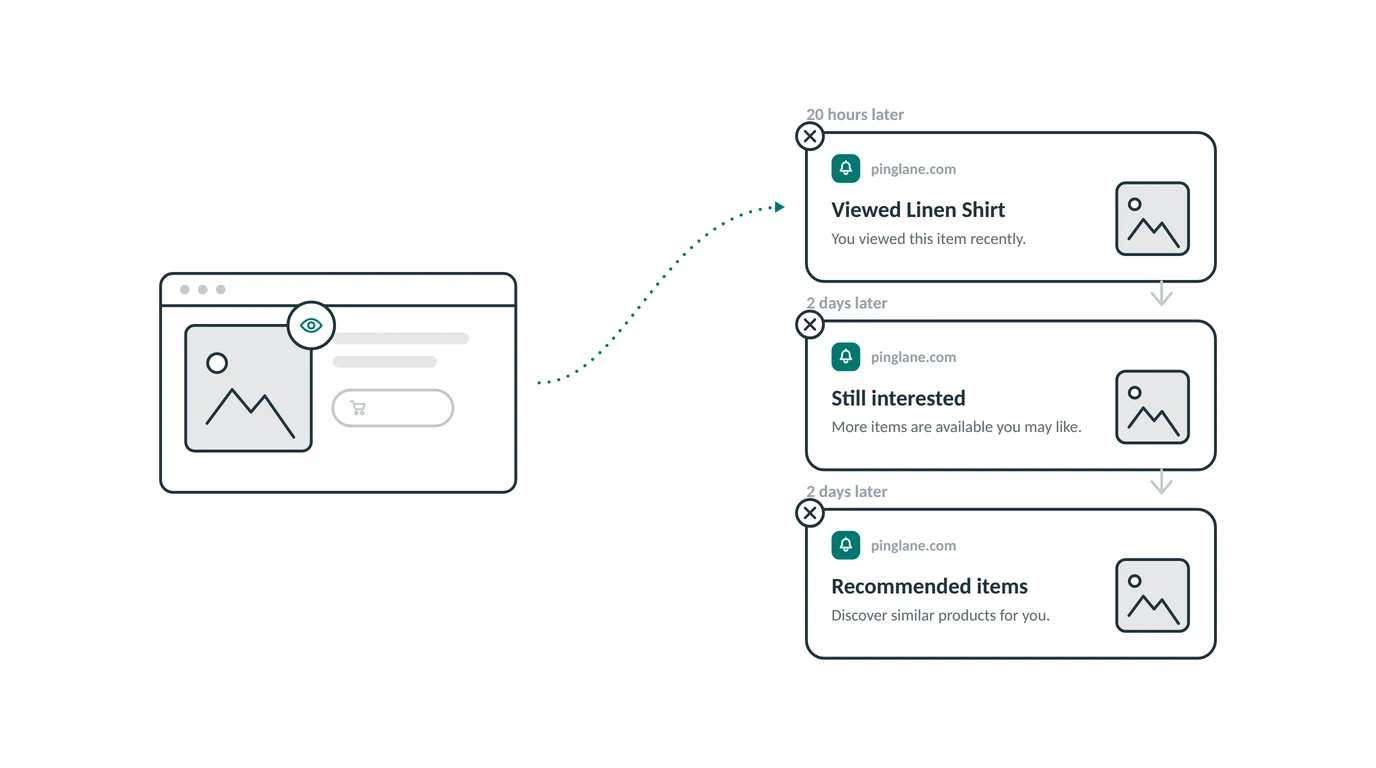
Browse reminders send a short set of messages instead of one. Here is the timing you get by default:
- 20 hours after the visit. “You looked at this recently. Take another look.”
- 2 days later. A second nudge on the same product.
- 2 days later. A message pointing to products like it.
Notice how much slower this is than cart recovery, where the first message goes out after 20 minutes.
That gap is on purpose. Someone who filled a cart was minutes from buying, so a fast reminder catches them while the decision is fresh. Someone who only looked at a product was much earlier in their thinking. Messaging them twenty minutes later feels like being followed around the shop.
Waiting until the next day does something useful. It arrives after the interruption has passed, when the shopper is free again, and it reads like a helpful reminder instead of someone watching them.
You can change any of these wait times. You can set each step in minutes, hours, or days, and you can switch off any single step without turning off the whole automation. If three messages feels like too many for your store, use two.
How Browse Reminders and Cart Recovery Stay Out of the Way
This is worth knowing before you turn anything on, because it is the thing store owners worry about most.
If a shopper looks at a product, gets a browse reminder, comes back, and puts the item in their cart, they are now in two automations at once. Without a rule, they would get browse messages and cart messages about the same product.
That does not happen. The moment someone fills a cart, any browse reminders waiting for them are cancelled. Cart recovery takes over, because that message matters more.
You do not set this up. You do not have to think about it. It is simply how the two work together.
Writing Browse Reminder Messages
The tone matters more here than in cart recovery, because the shopper is less sure. Push too hard and it feels odd.
Talk about the product, not about them. “The Wool Coat is still available” is fine. “We noticed you looked at the Wool Coat for three minutes” is not.
Use the product photo. The picture reminds them faster than any sentence. They see it and remember why they liked it.
Keep it short. You only get about ten words in a push notification. Make every word count.
Do not lead with a discount. This shopper never said price was the problem. If you offer a discount right away, you teach shoppers to wait for discounts before buying anything. Save that for a later step, if at all.
Change the angle each time. Three messages saying the same thing is nagging. A good shape is: remind them, then give a reason such as low stock, then show similar products in case that exact item was not quite right.
Link to the product page. Straight to the item they looked at. No home page, no collection.
Mistakes to Avoid
Sending the first message too fast. Twenty minutes after someone looks at a product feels like you are watching them. Give it hours, not minutes.
Using too many steps. Three is plenty. Five reminders about a product someone glanced at is how you get people to turn off your notifications.
Treating every product view the same. Someone who left after two seconds is not the same as someone who spent time reading the whole page. If your store gets a lot of accidental clicks, try a longer first wait.
Discounting straight away. It teaches shoppers to never buy at full price.
Forgetting the message is all they see. Your website design is not there to help. The notification title, the message text, and the photo have to do all the work.
Common Questions
Is this the same as an abandoned cart message? No. Cart recovery is for people who put something in their cart. Browse reminders are for people who only looked at a product. Our cart recovery guide covers the other one.
Will a shopper get both? No. Browse reminders are cancelled on their own as soon as that shopper fills a cart.
Do I need the shopper’s email address? No. Browse reminders go to push subscribers, who joined by clicking Allow once in their browser. You never learn who they are.
Is it on when I install? Yes. Browse reminders come switched on with messages and timing already set, so they start working as soon as you have subscribers.
Can I change how long it waits? Yes. Every step has its own wait time, set in minutes, hours, or days. You can also switch off single steps.
How do I know if it is working? Each automation shows how many people started it, how many got all the messages, and how many dropped out early, along with clicks and money earned.
Follow Up With the Shoppers Everyone Else Ignores
Most stores spend their effort on the small group who reach the cart, and let everyone else walk away forgotten.
Browse reminders cover the much bigger group in between: the people who were interested enough to look, and only needed something to bring them back.
Install PingLane from the Shopify App Store and browse reminders start running on your store the same day.