

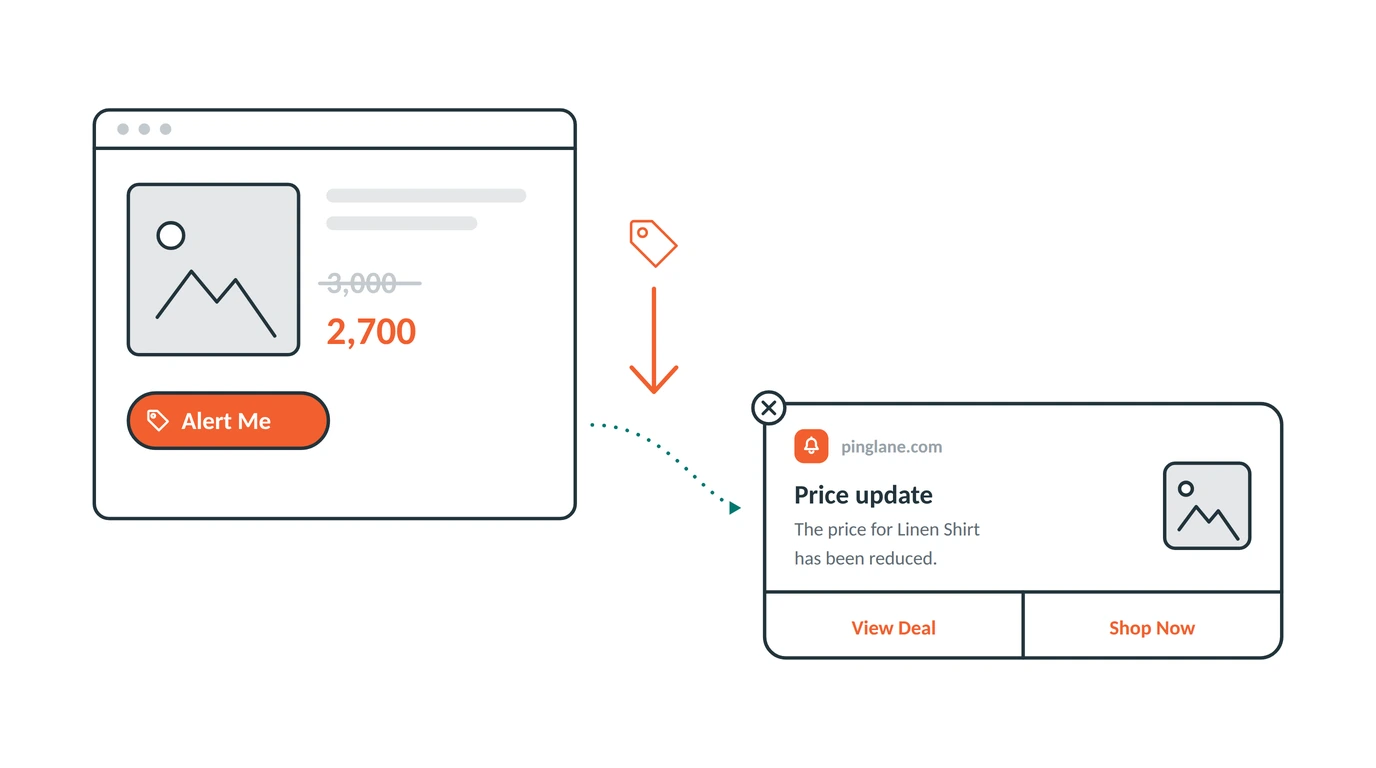
Some shoppers do not leave your store because they dislike your product. They leave because of the price.
They liked it. They looked at the photos. They read the details. Then they saw the number, thought “not today”, and closed the tab.
Here is the annoying part. They never tell you. There is no box for “I want this but it costs too much”. They just go quiet, and you have no idea it happened.
Price drop alerts fix that. They give the shopper an easy way to say they want it, and they give you a way to reach that shopper the moment your price changes.
Almost no Shopify store uses this. That is exactly why it is worth your time.
How a Price Drop Alert Works
It is simple, and it runs on its own.
- Someone who already gets your notifications is on a product page. A small button shows up that says Alert Me.
- They tap it. PingLane writes down what the price is at that exact moment.
- From then on, that product is watched for them.
- The moment the price falls below the price they saw, a message goes to their screen.
The most important part is step two. The alert is not tied to a sale you announce. It is tied to the price that shopper personally saw. For example, if someone taps the button when an item is 100, and you later lower it to 80, they hear about it right away. That is true whether the change came from a sale, a seasonal discount, or a permanent price cut.
You never hit send. This is one of five automations that run quietly in the background, which we cover in our guide to Shopify push automations.
One thing worth knowing. The Alert Me button only shows to people who already said yes to your notifications. It does not ask for permission on its own. A push alert can only be delivered if someone has already clicked Allow for your notifications. Your permission prompt grows your list. This button tells you what your list is waiting for.
Why This Message Is Always Welcome
Most marketing messages get in the way. This one does not, and the reason matters.
The shopper asked for it. They picked that product, tapped a button about that product, and agreed to hear about one thing. When the message arrives, it is not an ad. It is the answer to a question they asked.
That changes how people react. Sending a mass discount to your whole list reaches mostly people who were not looking to buy. A price drop alert reaches only people who already decided they want the item and were waiting for a better price.
You are not talking anyone into it. You are just telling them the wait is over.
The Part Most Stores Miss
Here is the benefit nobody talks about.
Every time someone taps Alert Me, they are telling you something you normally cannot find out: this product costs more than I will pay today.
Collect a few hundred of those and you have a useful map of your store. You can see which products people want but hesitate to buy. You can see which ones people buy without hesitation, which usually means you have room to charge more. You can see whether a whole group of products is priced wrong, or just one item.
Most stores guess at this. They run a sale, watch what sells, and try to work backwards. A price drop list tells you straight, before you cut a single price.
Even if you never sent one alert, the list would be worth having.
Which Stores Should Use This
Price drop alerts are not equally useful for everyone. They pay off fastest when:
Your products cost enough to think about. If your average order is small, people buy on the spot and rarely wait for a better price. If your items are more expensive, shoppers usually take time to think, and this alert brings them back.
You run sales. Seasonal sales, clearance, end of line discounts. Every one of these turns into an automatic message to the exact people who were waiting.
You sell things people compare. Electronics, furniture, clothes, anything a shopper opens in five tabs before deciding.
Your prices move. If you never change a price, the alert never sends and there is nothing to gain.
If none of these sound like your store, put your time into back in stock alerts or browse reminders first.
What to Put in the Message
Keep it plain. The shopper already wants the product, so the message has one job: tell them the price moved.
Say the product name. “The price dropped” is weak. “The Oak Dining Chair is now cheaper” is clear.
Show the photo. They may have tapped weeks ago. The picture reminds them right away.
Share the facts, not the hype. “Price reduced” does the job. You do not need words like “amazing offer” or a bunch of emojis.
Link straight to the product page. One tap from the message to the buy button. Never send them to the home page.
Do not make up a deadline. If the lower price is permanent, saying “today only” is a lie the shopper can check. That costs you trust you will need later.
Mistakes to Avoid
Hiding the button. If people never notice the Alert Me button, no list gets built and the automation has nothing to do.
Using it as a discount channel. This list is for price changes on one product, not for general sales. Send them unrelated offers and they will turn off your notifications.
Turning it on when you never plan to discount. If your prices never move, the people who tapped are waiting forever. Either use it or leave it off.
Ignoring what it tells you. The list of watched products is saying something about your prices. Read it.
Common Questions
Do shoppers need to give an email address? No. Push subscribers stay unknown to you the whole time, and joining a price watch list is one tap with nothing to type.
Does the Alert Me button ask people to allow notifications? No. It only shows to people who already said yes. Your permission prompt is what invites new visitors to say yes.
What price does it compare against? The price the shopper saw when they tapped. If it later goes below that number, they get a message.
What if I raise the price instead? Nothing sends. They stay on the list until the price actually drops below what they saw.
Does this steal sales from people who would have paid full price? It can, which is why it suits products where people stop and think. The people on this list already showed you they were not buying at the current price.
How is this different from a back in stock alert? Back in stock watches your stock. Price drop watches your price. Both use the same kind of button, and both send the moment the thing they watch changes. Our back in stock guide covers that one.
Is it on by default? No. It starts off, because the button needs to be added to your product pages first.
Give Unsure Shoppers a Way to Say Yes Later
Right now, the shopper who thinks your product is too costly leaves without a trace. You get nothing from that visit.
A price drop alert turns that quiet exit into an interested subscriber on your list, and turns your next sale into a message that lands with people who were already waiting for it.
Install PingLane from the Shopify App Store and switch on the automation nobody else is using.